Add Disqus blog comments engine.
I use my own AvbDisqus extension to add Disqus functionality to my MediaWiki site.
Source code of Disqus extension for MediaWiki can be found there: http://devwiki.beloblotskiy.com/index.php5/AvbDisqus_(MediaWiki_extension)
Showing posts with label extension. Show all posts
Showing posts with label extension. Show all posts
Friday, August 28, 2009

Thursday, August 27, 2009
Google AdSense
Adding Google AdSense module into MediaWiki.
Ad module added with help of Google AdSense extension for MediaWiki engine. This small extension does all routine work.
LocalSettings.php
require_once( "extensions/GoogleAdSense/GoogleAdSense.php" );
$wgGoogleAdSenseClient = 'pub-8940041409402700';
$wgGoogleAdSenseSlot = '2005982900';
$wgGoogleAdSenseID = 'AvbWiki_Right_Skyscraper_120x600';
$wgGoogleAdSenseWidth = 120;
$wgGoogleAdSenseHeight = 600;
All these parameters are from Google AsSense code.
As always, all extensions are listed here...
Ad module added with help of Google AdSense extension for MediaWiki engine. This small extension does all routine work.
- Download Google AdSense extension for MediaWiki (1.14+).
- Unpack to "extensions" directory.
- Update LocalSettings.php (see below).
- Update common.css (http://devwiki.beloblotskiy.com/index.php5?title=MediaWiki:Common.css). New CSS fragment can be found here. This step is really optional.
LocalSettings.php
require_once( "extensions/GoogleAdSense/GoogleAdSense.php" );
$wgGoogleAdSenseClient = 'pub-8940041409402700';
$wgGoogleAdSenseSlot = '2005982900';
$wgGoogleAdSenseID = 'AvbWiki_Right_Skyscraper_120x600';
$wgGoogleAdSenseWidth = 120;
$wgGoogleAdSenseHeight = 600;
All these parameters are from Google AsSense code.
As always, all extensions are listed here...
Friday, October 17, 2008
Google Analytics
How to add Google Analytics script into MediaWiki engine? Or how I've wrote my first MediaWiki extension. The first idea was to patch skins and add analytics script before </body> tag. Of course, it isn't nice to patch all skins and keep these files coherent in future. Next idea was to patch Skin::bottomScripts() or Skin::outputPage(). Finally, I've decided to write extension which use one of standard hooks to add additional JavaScript code in result page generated by MediaWiki.
Finally:
MediaWiki extension to add Google Analytics script in each wiki page.
Check product home page.
Create file /extensions/AvbGoogleAnalytics/AvbGoogleAnalytics.php
This is extension body written on PHP.
And the final step - add the line below at the end of your LocalSettings.php
Full article is here.
Finally:
MediaWiki extension to add Google Analytics script in each wiki page.
Check product home page.
Create file /extensions/AvbGoogleAnalytics/AvbGoogleAnalytics.php
This is extension body written on PHP.
<?php

if( !defined( 'MEDIAWIKI' ) ) die( -1 );

// Add hook on SkinAfterBottomScripts.
$wgHooks['SkinAfterBottomScripts'][] = 'onSkinAfterBottomScripts_AddAvbGoogleAnalyticsScript';


// returns Google Analytics tracker script
function getAvbGoogleAnalyticsScript($analytics_id)
{
$s = "\n<!-- avb: AvbGoogleAnalytics -->\n"
   . "<script type=\"text/javascript\">\n"
   . "var gaJsHost = ((\"https:\" == document.location.protocol) ? \"https://ssl.\" : \"http://www.\");\n"
   . "document.write(unescape(\"%3Cscript src='\" + gaJsHost + \"google-analytics.com/ga.js' type='text/javascript'%3E%3C/script%3E\"));\n"
       . "</script>\n"
   . "<script type=\"text/javascript\">\n"
   . "var pageTracker = _gat._getTracker(\"" . $analytics_id . "\");\n"
   . "pageTracker._trackPageview();\n"
   . "</script>\n"
   . "<h6>avb:2</h6>\n";

return $s;
}

// Event 'SkinAfterBottomScripts': At the end of Skin::bottomScripts()
// $skin: Skin object
// &$text: bottomScripts Text
// Append to $text to add additional text/scripts after the stock bottom scripts.
// Documentation: \mediawiki-1.13.0\docs\hooks.txt
function onSkinAfterBottomScripts_AddAvbGoogleAnalyticsScript($skin, &$text)
{

// Change "YOUR-ANALYTICS-ID" to your actual analytics id
// (analytics id is string like "UA-1223032-7")
$text .= getAvbGoogleAnalyticsScript("YOUR-ANALYTICS-ID");
return true;
}

?>
And the final step - add the line below at the end of your LocalSettings.php
require_once("extensions/AvbGoogleAnalytics/AvbGoogleAnalytics.php");
Full article is here.
Saturday, September 20, 2008
Dynamic Page List
Today I'm looking for plug-in for generating article list for main page (for example, list of new articles or list of new edits). It seems DynamicPageList extension will be helpful in this situation. In fact, DynamicPageList or (also known as DPL) is base for number of other plug-ins (for example, Wgraph, TreeAndMenu, Calendar).
DPL manual is here.
As recommended here, I'll install DynamicPageList itself and Call and Inputbox. There are no cross references in DPL extensions in Semeb_extensions.zip!
Step 1
Invoke DPL from your LocalSettings.php with
Step 2: skipped
Step 3: skipped
DPL manual is here.
As recommended here, I'll install DynamicPageList itself and Call and Inputbox. There are no cross references in DPL extensions in Semeb_extensions.zip!
Step 1
Invoke DPL from your LocalSettings.php with
require_once("extensions/DynamicPageList/DynamicPageList2.php");
Step 2: skipped
There is a special feature in DPL which needs another extension: If you use page inclusion and want to use images as link symbols for the original source you must install the LinkedImage extension. For details see there.
Step 3: skipped
In some special cases (when DPL queries refer to uncategorized pages) DPL needs a special database view in the MySQL database. You should run the database statement which creates that view if you want to use DPL statements which refer to uncategorized pages. Many installations work well without that and you can postpone this step until you really need it. If DPL cannot execute a DPL statement without that view it will issue a corresponding warning. More...
Saturday, September 13, 2008
Enable TeX
Add tex-style math expression support functionality into MediaWiki.
Here is the complete recipe to add TeX support.
The official way to do it based on texvc which is written on Caml, so you need texvc binary (try to find it!) or calm compiler binary to compile texvc, so
I prefer more convenient way to add tex math expressions into my wiki:
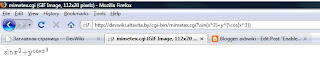 So, good news is that the mimetex is working, but it accessible for everyone over the web! Now I'll do few steps to integrate mimetex into MediaWiki and correct accessibility trouble later (this situation is convinient for testing).
TeX in MediaWiki
About TeX:
If somebody knows how to prevent direct access to mimetex.cgi from the web, please, notify me via comment to this post! I see the only way - make changes into mimetex.cgi code, but it is not very convenient to reapply my own changes when new version of mimetex.cgi will come. I've tried to solve this with Apache rewrite rules, but...
this is working, but how to split direct access and access from PHP?
Here is the complete recipe to add TeX support.
The official way to do it based on texvc which is written on Caml, so you need texvc binary (try to find it!) or calm compiler binary to compile texvc, so
- compile caml compiler with c++ compiler;
- compile texvc with caml compiler;
- plus: adjust all paths into makefiles;
- install LaTeX and dvips;
- install ImageMagic (aka convert utility);
- install Ghostscript;
I prefer more convenient way to add tex math expressions into my wiki:
- download mimeTeX from http://www.forkosh.com/mimetex.html (binaries are also available there);
- extract mimetex.cgi into cgi-bin directory;
- test it: go to http://host/cgi-bin/mimetex.cgi?\sin{x^2}+y^{\cos{x^3}}
 So, good news is that the mimetex is working, but it accessible for everyone over the web! Now I'll do few steps to integrate mimetex into MediaWiki and correct accessibility trouble later (this situation is convinient for testing).
- read http://www.mediawiki.org/wiki/Mimetex_alternative
- create mimetex.php into wiki_home/extensions/mimetex folder. See code below:
<?php

$wgExtensionFunctions[] = "MimetexExtension";

function MimetexExtension() {
global $wgParser;
# register the extension with the WikiText parser
# the first parameter is the name of the new tag.
# In this case it defines the tag <example> ... </example>
# the second parameter is the callback function for
# processing the text between the tags
$wgParser->setHook( "tex", "render_Mimetex" );
}

/**
* Renders $text in Mimetex
*/

function render_Mimetex($input, $argv, $parser = null) {

if (!$parser) $parser =& $GLOBALS['wgParser'];
// $img_url is the url the mimetex will be sent to.
// IMPORTANT!! The URL below should be the link to YOUR mimetex.cgi if possible
// $img_url = "http://www.forkosh.dreamhost.com/mimetex.cgi?".$input;
$img_url = "/cgi-bin/mimetex.cgi?".$input;

// Sets the output of the tex tag using the url from above, and the input as
// the Alt text.  It's important to note that there is no error output added yet.
$output = "<img src=\"$img_url\" alt= \"$input\" />";

return $output;
}
?>
- Warning! $img_url in the listing above should point to minitex.cgi
$img_url = "/cgi-bin/mimetex.cgi?".$input; - add
require("extensions/mimetex/mimetex.php");at the end of LocalSettings.php - set $wgUseTeX to true in LocalSettings.php
- try to add TeX expression somewhere in wiki, for example:
<tex>\sin{x^2}+y^{\cos{x^2}}</tex>
TeX in MediaWiki
- TeX notation manual: http://meta.wikimedia.org/wiki/Help:Formula
- http://www.mediawiki.org/wiki/LaTeX_on_a_shared_host
- http://www.mediawiki.org/wiki/PhpMathPublisher_alternative
- http://www.mediawiki.org/wiki/Mediawiki_and_LaTeX_on_a_host_with_shell_access
About TeX:
If somebody knows how to prevent direct access to mimetex.cgi from the web, please, notify me via comment to this post! I see the only way - make changes into mimetex.cgi code, but it is not very convenient to reapply my own changes when new version of mimetex.cgi will come. I've tried to solve this with Apache rewrite rules, but...
RewriteCond %{REQUEST_URI} .*mimetex\.cgi.* [NC]
RewriteRule ^(.*)$ index.php [F,L]
this is working, but how to split direct access and access from PHP?
Syntax highlight
Add syntax highlighting functionality.
I think I'll write many code snippets, so it's necessary to add programming languages syntax highlight into my MediaWiki engine.
I tried to find the same plug-in (extension) like is used in Wikipedia project. It seems these guys use something like SyntaxHighlight_GeSHi, because they format code snippets with <source> tag.
SyntaxHighlight_GeSHi
http://www.mediawiki.org/wiki/Extension:SyntaxHighlight_GeSHi
svn co http://svn.wikimedia.org/svnroot/mediawiki/trunk/extensions/SyntaxHighlight_GeSHi ./SyntaxHighlight_GeSHi
GeSHi itself
http://qbnz.com/highlighter/
http://sourceforge.net/project/showfiles.php?group_id=114997&package_id=124605&release_id=618638
To add frame around source code (like around <pre> tag) change main.css into skin folder:
/* avb: add div.source-XXX for SyntaxHighlight_GeSHi */
pre, div.source-abap, div.source-actionscript, div.source-ada, div.source-apache, div.source-applescript, div.source-asm, div.source-asp, div.source-autoit, div.source-bash, div.source-basic4gl, div.source-blitzbasic, div.source-bnf, div.source-c, div.source-c_mac, div.source-caddcl, div.source-cadlisp, div.source-cfdg, div.source-cfm, div.source-cpp-qt, div.source-cpp, div.source-csharp, div.source-css, div.source-d, div.source-delphi, div.source-diff, div.source-div, div.source-dos, div.source-dot, div.source-eiffel, div.source-fortran, div.source-freebasic, div.source-genero, div.source-gml, div.source-groovy, div.source-haskell, div.source-html4strict, div.source-idl, div.source-ini, div.source-inno, div.source-io, div.source-java, div.source-java5, div.source-javascript, div.source-latex, div.source-Code, div.source-lisp, div.source-lua, div.source-m68k, div.source-matlab, div.source-mirc, div.source-mpasm, div.source-mysql, div.source-nsis, div.source-objc, div.source-ocaml-brief, div.source-ocaml, div.source-oobas, div.source-oracle8, div.source-pascal, div.source-per, div.source-perl, div.source-php-brief, div.source-php, div.source-plsql, div.source-python, div.source-qbasic, div.source-rails, div.source-reg, div.source-robots, div.source-ruby, div.source-sas, div.source-scheme, div.source-sdlbasic, div.source-smalltalk, div.source-smarty, div.source-sql, div.source-tcl, div.source-text, div.source-thinbasic, div.source-tsql, div.source-vb, div.source-vbnet, div.source-vhdl, div.source-visualfoxpro, div.source-winbatch, div.source-xml, div.source-xpp, div.source-z80 {
padding: 1em;
border: 1px dashed #2f6fab;
color: black;
background-color: #f9f9f9;
line-height: 1.1em;
}
It was "pre { ... }" only.
I think I'll write many code snippets, so it's necessary to add programming languages syntax highlight into my MediaWiki engine.
I tried to find the same plug-in (extension) like is used in Wikipedia project. It seems these guys use something like SyntaxHighlight_GeSHi, because they format code snippets with <source> tag.
SyntaxHighlight_GeSHi
http://www.mediawiki.org/wiki/Extension:SyntaxHighlight_GeSHi
svn co http://svn.wikimedia.org/svnroot/mediawiki/trunk/extensions/SyntaxHighlight_GeSHi ./SyntaxHighlight_GeSHi
GeSHi itself
http://qbnz.com/highlighter/
http://sourceforge.net/project/showfiles.php?group_id=114997&package_id=124605&release_id=618638
To add frame around source code (like around <pre> tag) change main.css into skin folder:
/* avb: add div.source-XXX for SyntaxHighlight_GeSHi */
pre, div.source-abap, div.source-actionscript, div.source-ada, div.source-apache, div.source-applescript, div.source-asm, div.source-asp, div.source-autoit, div.source-bash, div.source-basic4gl, div.source-blitzbasic, div.source-bnf, div.source-c, div.source-c_mac, div.source-caddcl, div.source-cadlisp, div.source-cfdg, div.source-cfm, div.source-cpp-qt, div.source-cpp, div.source-csharp, div.source-css, div.source-d, div.source-delphi, div.source-diff, div.source-div, div.source-dos, div.source-dot, div.source-eiffel, div.source-fortran, div.source-freebasic, div.source-genero, div.source-gml, div.source-groovy, div.source-haskell, div.source-html4strict, div.source-idl, div.source-ini, div.source-inno, div.source-io, div.source-java, div.source-java5, div.source-javascript, div.source-latex, div.source-Code, div.source-lisp, div.source-lua, div.source-m68k, div.source-matlab, div.source-mirc, div.source-mpasm, div.source-mysql, div.source-nsis, div.source-objc, div.source-ocaml-brief, div.source-ocaml, div.source-oobas, div.source-oracle8, div.source-pascal, div.source-per, div.source-perl, div.source-php-brief, div.source-php, div.source-plsql, div.source-python, div.source-qbasic, div.source-rails, div.source-reg, div.source-robots, div.source-ruby, div.source-sas, div.source-scheme, div.source-sdlbasic, div.source-smalltalk, div.source-smarty, div.source-sql, div.source-tcl, div.source-text, div.source-thinbasic, div.source-tsql, div.source-vb, div.source-vbnet, div.source-vhdl, div.source-visualfoxpro, div.source-winbatch, div.source-xml, div.source-xpp, div.source-z80 {
padding: 1em;
border: 1px dashed #2f6fab;
color: black;
background-color: #f9f9f9;
line-height: 1.1em;
}
It was "pre { ... }" only.
Subscribe to:
Posts (Atom)